Create
From one colour to a system you can ship.
Start with a brand colour and get scales, accessible combinations, semantic tokens, light and dark themes, and code exports. Open any palette in the generator to continue.
Free color toolkit · No sign-up
Palettes, WCAG contrast, tokens, and dark mode — ready to ship.
Type one color and ChromaBrew computes a 50–950 scale, semantic tokens, light and dark themes, and every pair graded against WCAG — then exports it as CSS variables, DTCG JSON, Tailwind v4, shadcn/ui or Figma variables. It all runs in your browser: no account, nothing uploaded.
The generator is the front door. Behind it sits the rest of the work: 22 standalone tools for contrast ratios, color blindness, converters, gradients and shade scales — each with a written intro, steps and FAQs; 51 step-by-step guides on palette theory, WCAG math, dark mode and token handoff, dated and edited as the standards change; 1,000 curated palettes across 50 themes; and a free website audit that renders your live page in a real browser and reports measured accessibility failures.
Try:
Free, no account — or audit a website.
Colour, up close
Every palette starts with a single colour. ChromaBrew turns it into scales, tokens, live interface previews, and measured WCAG grades — try it on yours.
Create
Start with a brand colour and get scales, accessible combinations, semantic tokens, light and dark themes, and code exports. Open any palette in the generator to continue.
Audit
Inspect a public website, discover measured design and accessibility issues, and get actionable recommendations. Free, no account needed to run it.
Free website audit
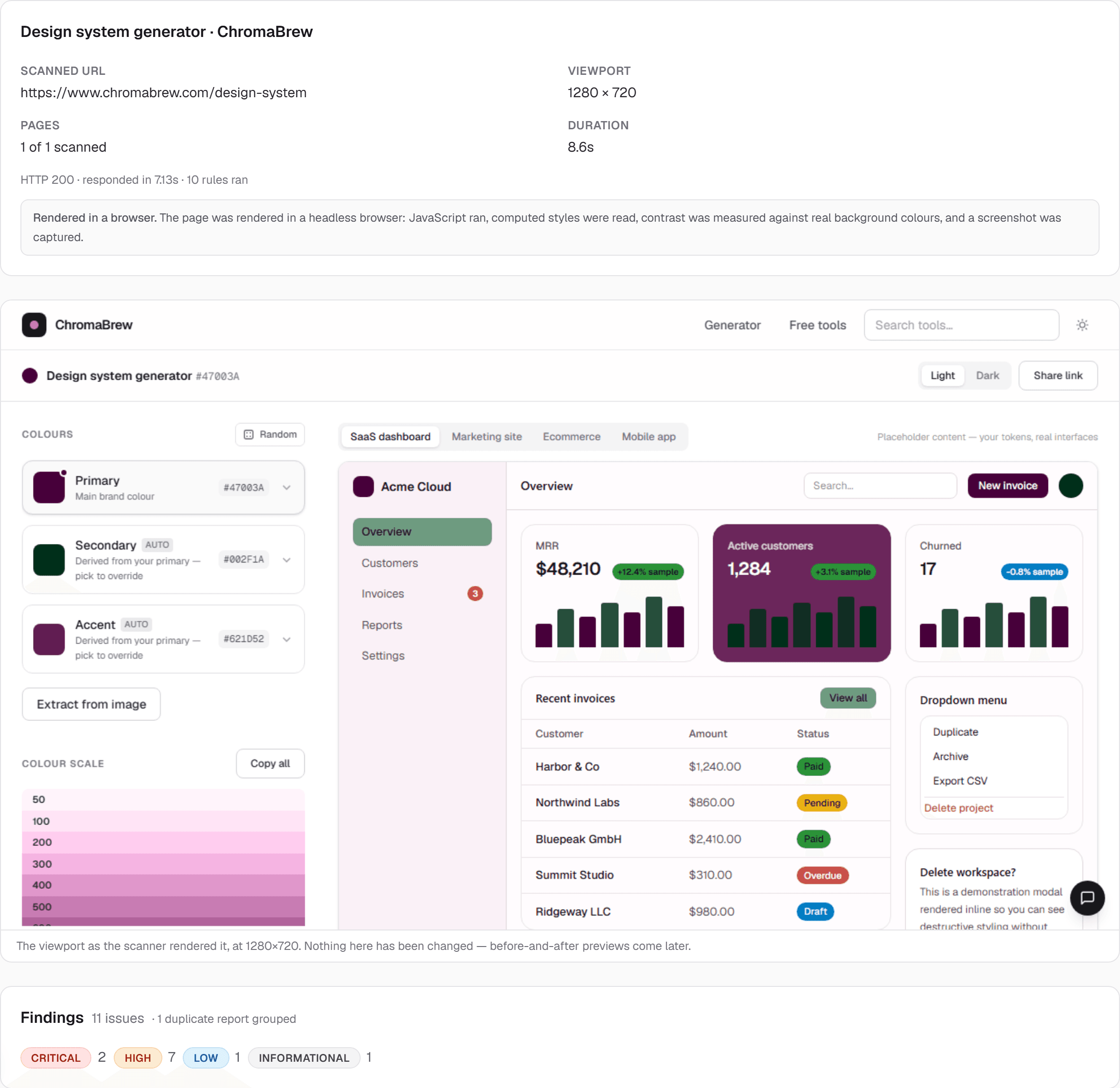
Paste a public URL. ChromaBrew renders the page, measures contrast from computed styles, and runs axe-core 4.13 plus structural checks — every finding ships with its selector and a fix you can apply. Nothing is changed on your site, and a clean report is not a conformance certificate.
Step 1
Enter a public website URL
Paste any public page — no account, nothing to install.
Step 2
Scan and inspect the rendered page
Headless Chromium at desktop (1280×720) or mobile (390×844), screenshot included.
Step 3
Review measured findings
Contrast from computed styles, axe-core 4.13 plus ten structural rules — selector and values attached.
Step 4
Inspect recommended improvements
Where a fix exists, it is shown next to the failing values it replaces — CSS or token guidance you apply.
Step 5
Re-scan to validate fixes
Re-run the audit on the updated page to confirm the finding clears.
Fix what it finds with the tools you already have here: grade two colours in the contrast checker, grade a whole palette at once in the WCAG palette checker, rebuild a failing scale in the shade generator, or generate an accessible dark theme with the dark mode generator.
What the design system generator produces from your color — measured, themed and exportable.
50–950 steps computed in OKLCH, so every stop is evenly spaced to the eye.
Background, surface, primary, border and status roles that map to real components.
Key pairs graded against WCAG AA/AAA from measured values — fixes offered, never assumed.
CSS variables, DTCG-style JSON, Tailwind v4 themes, shadcn/ui variables and Figma Tokens to paste in — plus a free Figma plugin for native variables.
Focused tools for each step — or browse all free tools.
Pro
Everything that generates, checks, and exports is free. Pro adds saving, every export adapter, and AI — verified against the live plans below.
Everything you need to generate a design system from one color.
For teams that ship design systems at scale.
Generate a palette, tokens, light and dark themes, and production-ready CSS from a single HEX — or run a free audit on a live URL. Free, no account required.
Is ChromaBrew really free?
Yes — generators, checkers, and core exports run free with no account. Saving projects is what asks for one.
What is Pro?
Unlimited saving, version history, every export adapter, and AI features. See pricing.
Can I use these palettes in Tailwind or CSS?
Yes — open any palette in the design system generator and export CSS, Tailwind v4, shadcn/ui, or JSON.
Can it audit a site I already shipped?
Yes — the free website audit renders the live page and proposes fixes. Nothing changes on your site.